Tests
Check your AI agent against simulated customers before you deploy a change, and see a pass rate for each scenario that matters.
A test is a conversation your AI agent has with a simulated customer. You describe who the customer is and what they want, and you write the one thing that must be true for the conversation to count as a pass. Cloodot plays the customer, lets your agent answer, and an AI judge marks the conversation Passed or Failed.
The same customer can get a different conversation each time, because replies vary. So a test runs several conversations at once and gives you a pass rate, not a single yes or no.
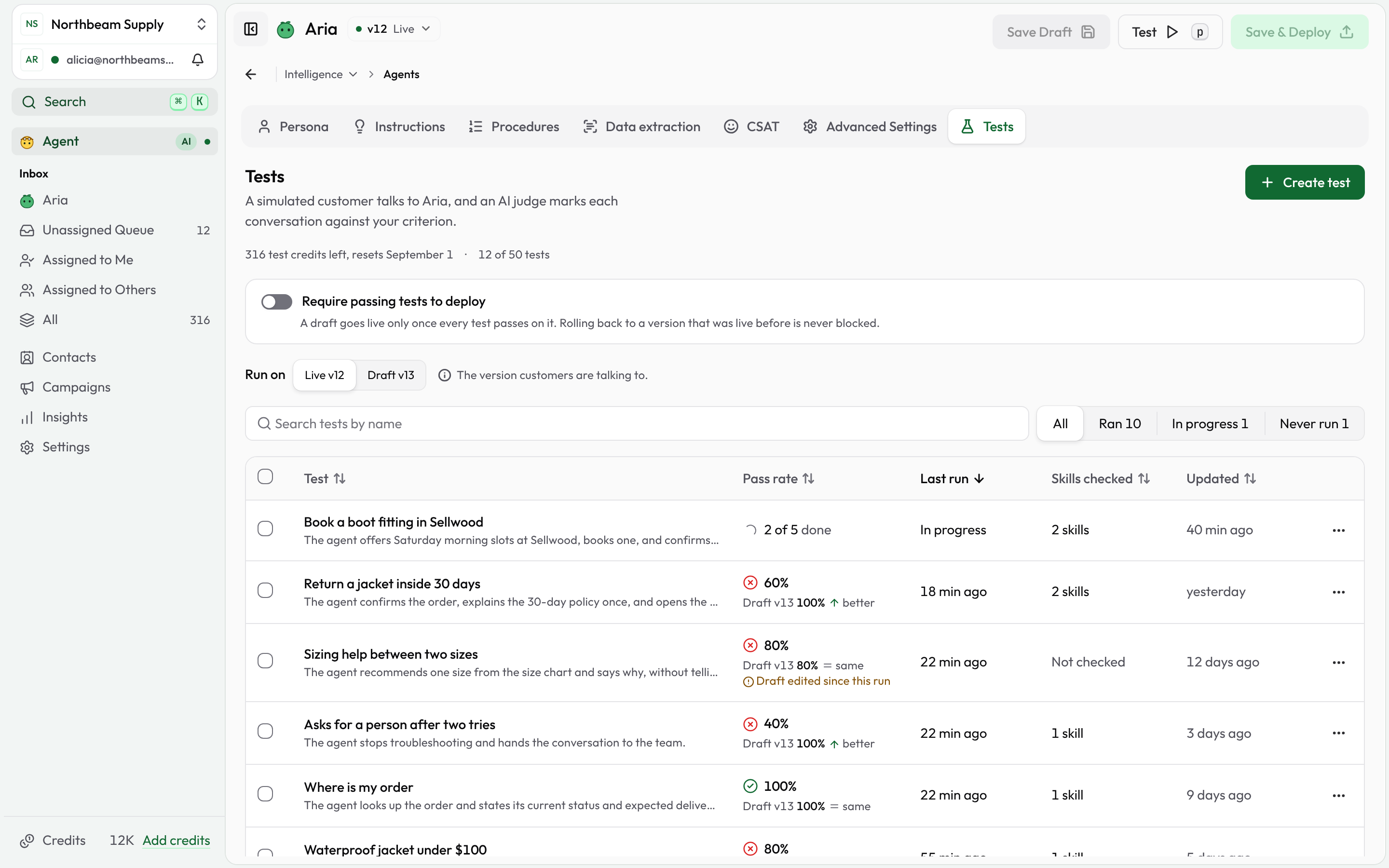
Tests are rolling out to workspaces gradually. If you don't see a Tests tab on your agent, it isn't turned on for your workspace yet. Ask us at support@cloodot.com.
When to use a test
Use a test for any conversation you never want the agent to get wrong:
- Before you deploy a change. Run your tests on the draft and compare the result with the live version.
- For a procedure that matters. A return, a booking, a handover: one test per scenario.
- When a skill must run. Say which skills the agent has to call, and the test checks that it did.
- After a bad conversation. Turn the real conversation into a test so the fix stays fixed.
Tests live on the Tests tab of your agent (Intelligence → Agent). They belong to the agent, not to one version, so the same tests apply to every version you save.
You need permission to edit the agent to create, edit or run tests. Without it, you can read tests and their results.
Create a test
1. Open the Tests tab
Go to Intelligence → Agent, open your agent, and select the Tests tab.
2. Click Create test
The editor opens on one page, in four sections, read top to bottom.
3. Fill in the test
Name it, describe the customer, write the success criterion, and pick skills if they matter. Each field is described below.
4. Save, or save and run
Save keeps the test without running it. Save and run saves it and starts a run straight away, on the version and with the number of conversations shown beside the button.
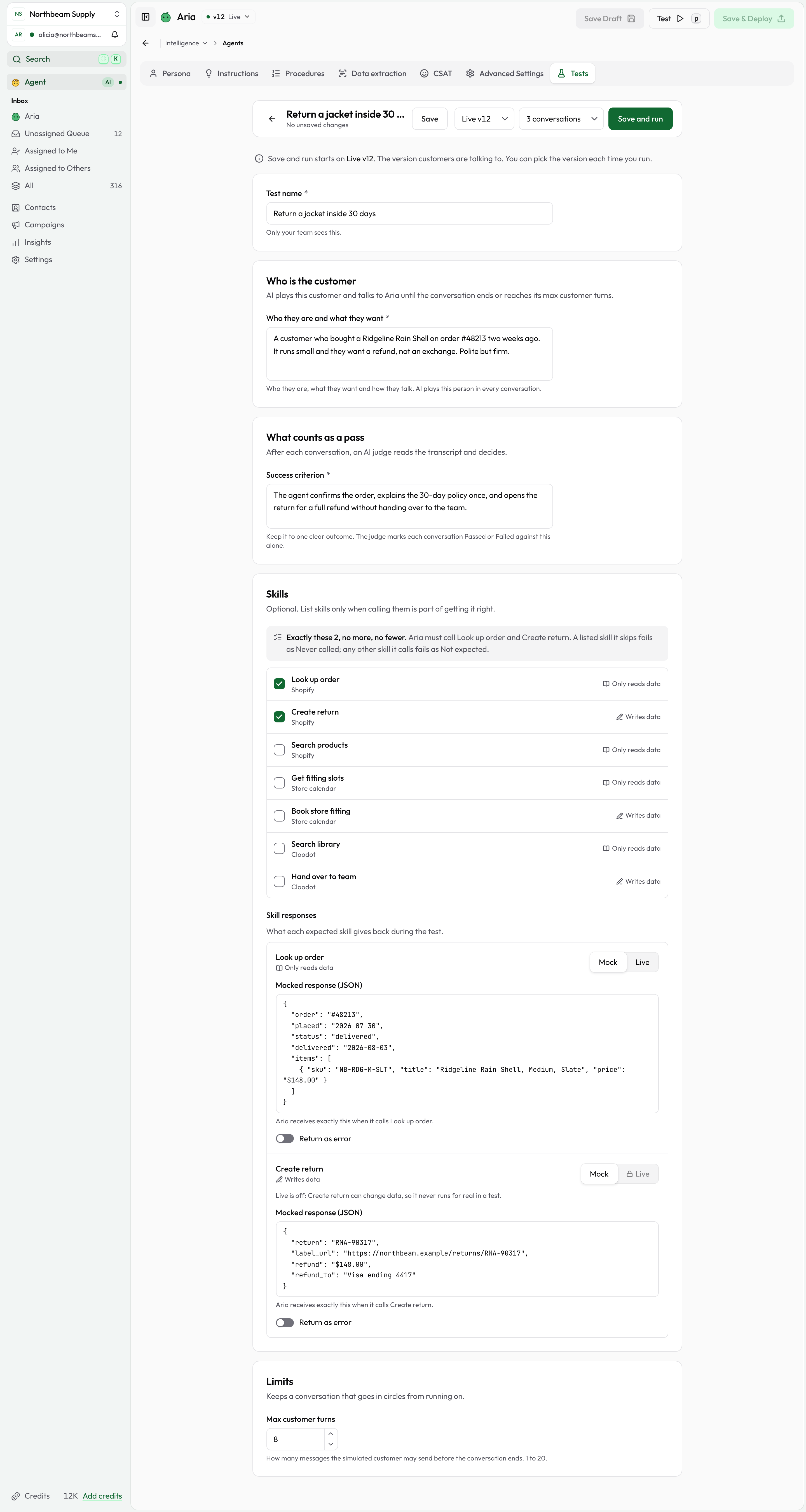
Test name
A label for your team, like "Return a jacket inside 30 days". Only your team sees it.
Who is the customer
In Who they are and what they want, describe the person an AI plays in every conversation: who they are, what they want and how they talk. The simulated customer sees only this and the conversation so far. It never sees your agent's instructions or your success criterion.
Write a good customer like this:
- One person, one goal. "Megan bought a rain shell on order #48213 two weeks ago. It runs small and she wants a refund, not an exchange."
- Give them the facts they'd have. An order number, a store, a date. A customer who has to invent details invents different ones each run, and the test fails for the wrong reason.
- Say how they talk when it matters: short and impatient, or writes in Spanish. Leave it out when it doesn't.
- Say when they're done, if the scenario has an end: "She's happy once the return is open." The customer ends the conversation once they have what they came for, or gives up.
- Don't write the agent's side. "The agent should ask for the order number" belongs in the criterion, if anywhere.
What counts as a pass
The Success criterion is the one thing that must be true for a conversation to pass. After each conversation, the judge reads the transcript, including every skill the agent called and what came back, the procedure that steered each reply, and the labels and custom fields the conversation would have been given, and decides against this alone.
- One outcome you can check from the transcript. "The agent opens the return for a full refund and doesn't hand over to the team." Not "handles the return well".
- Two outcomes? Write two tests. A criterion with "and also" fails for either reason, and the judge's reason may only name one of them.
- Say what must happen, not the exact words. "Gives the Beaverton store's opening hours" passes however the agent phrases it.
- A handover can be the right answer. "The agent hands the conversation to a person before quoting a wholesale price" is a fine criterion.
- You can check a procedure. "The agent follows the Returns procedure to its last step" works, because each reply records which procedure steered it and how far through it the agent was.
- You can check labels and custom fields. When a test conversation ends, labels, custom fields and sentiment are read from it the same way they are from a real conversation, and nothing is saved. "The conversation is labelled Billing" or "The contact's City field is set to Portland" are fine criteria.
Skills (optional)
Tick the skills the agent must call. List a skill only when calling it is part of getting the conversation right.
Expected skills are an exact set: the agent must call exactly the skills you ticked, no more and no fewer.
- A ticked skill the agent never calls fails the conversation as Never called.
- Any other skill the agent calls fails it as Not expected.
- Order doesn't matter, calling a skill twice counts once, and a call that returned an error still counts as called.
- Tick nothing and skills aren't checked: only the judge grades the conversation.
Because the check is exact, leave out a skill the agent only sometimes needs. If it calls that skill in one conversation and not another, the test fails on the skill check either way.
Each skill shows whether it Only reads data or Writes data.
Skill responses: Mock or Live
Under Skill responses, set what each ticked skill gives back during the test. Nothing reaches your customers either way.
- Mock (the default). Nothing really runs. The agent receives exactly what you write in Mocked response. When the skill returns JSON, the response must be valid JSON.
- Return as error. Switch it on to hand the mocked response back as a failed call, to test how the agent copes when an order lookup or a booking fails.
- Live. The real skill runs, so answers follow your live data. Live is offered only for skills that only read data, such as a skill set's search skills and Cloodot's knowledge base and collection searches. A skill that can change data, like creating a return or booking a fitting, can only be mocked: its Live option is locked.
A skill you didn't tick, or one with no response set, returns a generic success.
Mock the skills that change things. Run a search live when the test is about whether the agent finds the right answer in your real knowledge base or collections.
Max customer turns
Max customer turns is how many messages the simulated customer may send before the conversation ends: 1 to 20, and 8 by default. It stops a conversation that goes in circles from running on.
A conversation also ends when the customer is done, or when the agent hands it over or resolves it.
Run tests
Every run goes to one version of your agent. Choose it with Run on above the list (or the version picker beside Save and run in the editor):
- Live is the version customers are talking to.
- Draft is your saved draft, not live yet. Run on it to check a change before you deploy.
Only saved versions run. Unsaved edits in the agent editor are never tested, so save your draft first.
There are three ways to start a run:
- One test: open its ⋯ menu and choose Run test on, or click Run again on its results.
- Several tests: tick them in the list and click Run selected in the bar that appears.
- From the editor: Save and run.
Conversations per run
Each test runs as several conversations: 1, 3, 5, 10 or 20, and 3 by default. Pick the number from Conversations per test in the selection bar, or beside Save and run and Run again. One pass can be luck; three or more give you a pass rate you can trust.
What a run costs
Only your agent's replies are charged, at the same credits a real reply costs. The simulated customer, the judge and the labels and custom fields read at the end are free.
Runs use your test credits first. Test credits are a monthly allowance that depends on your plan. The list shows how many are left and when they reset. If test credits run out during a run, the rest comes from your message credits, the same credits your agent uses to reply to customers.
Before anything starts, Cloodot works out the worst case: every conversation using all its max customer turns. Most conversations end sooner and cost less. If the worst case could reach your message credits, you're asked first:
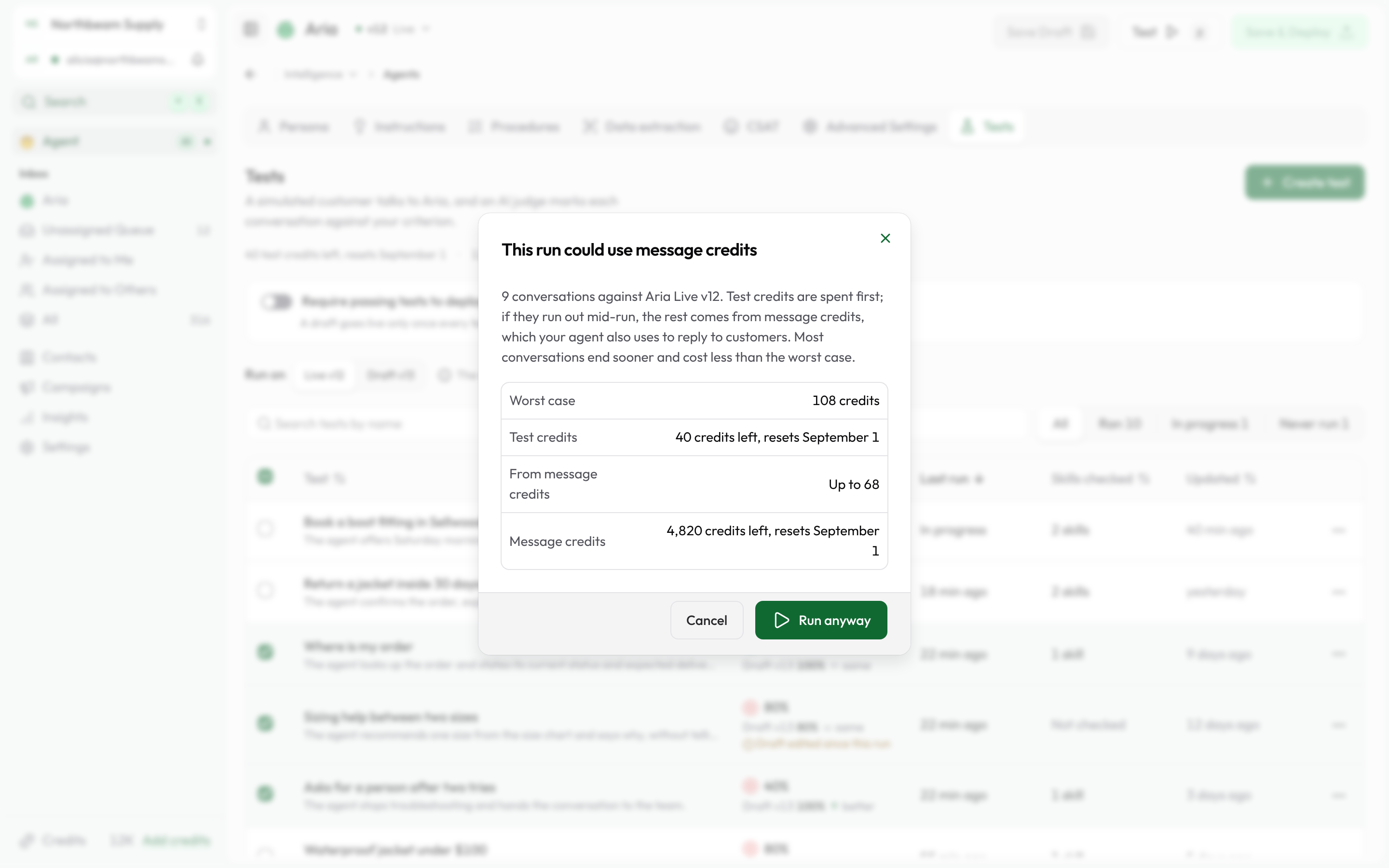
Click Run anyway to go ahead, or Cancel and nothing is spent.
A run doesn't start when:
- Your test credits and message credits are both used up. The message says when they reset.
- Credits can't be checked right now. Nothing is spent; try again in a minute.
The queue
Your workspace runs up to 5 test conversations at once. The rest wait as Queued and start as others finish. A run keeps going if you leave the page.
While a test is running, it can't be edited, deleted or run again. Its menu says "Edit and run come back when this run finishes." If you run several tests and some are already running, those are left as they are and the rest start.
Cancel a run
Open the run and click Cancel run. Queued conversations never start, and running ones stop. Conversations that already finished keep their results.
Read the results
Click a test in the list to open its latest run.
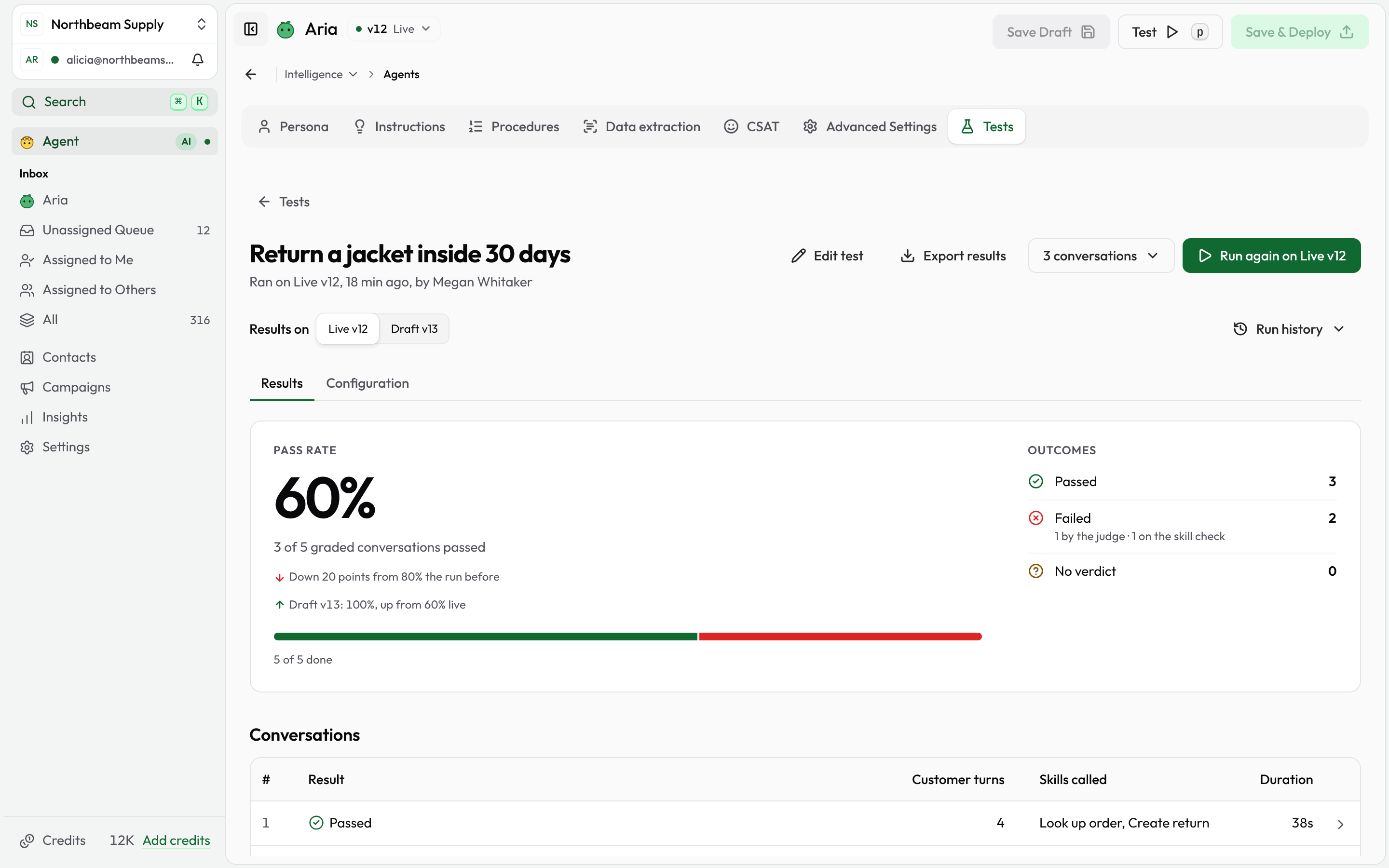
Pass rate and outcomes
Each conversation ends in one of three outcomes:
- Passed — the judge passed it and the skill check passed.
- Failed — the judge failed it, or the skill check did. Outcomes splits failures into "by the judge" and "on the skill check".
- No verdict — the conversation couldn't be graded, for example because it ran past its time limit or a step failed. It's shown, but not counted in the pass rate.
The pass rate is passed conversations out of graded ones (passed plus failed). Under it, Cloodot compares the run with the one before it on the same version, and, for a live run, with the draft's latest result.
A cancelled conversation is shown as Cancelled and isn't counted either.
Conversations
The Conversations table lists every conversation in the run with its result, the number of customer turns, the skills called and how long it took. A failed conversation shows the judge's reason, plus Never called or Not expected when the skill check caught it.
Click a conversation to read it:
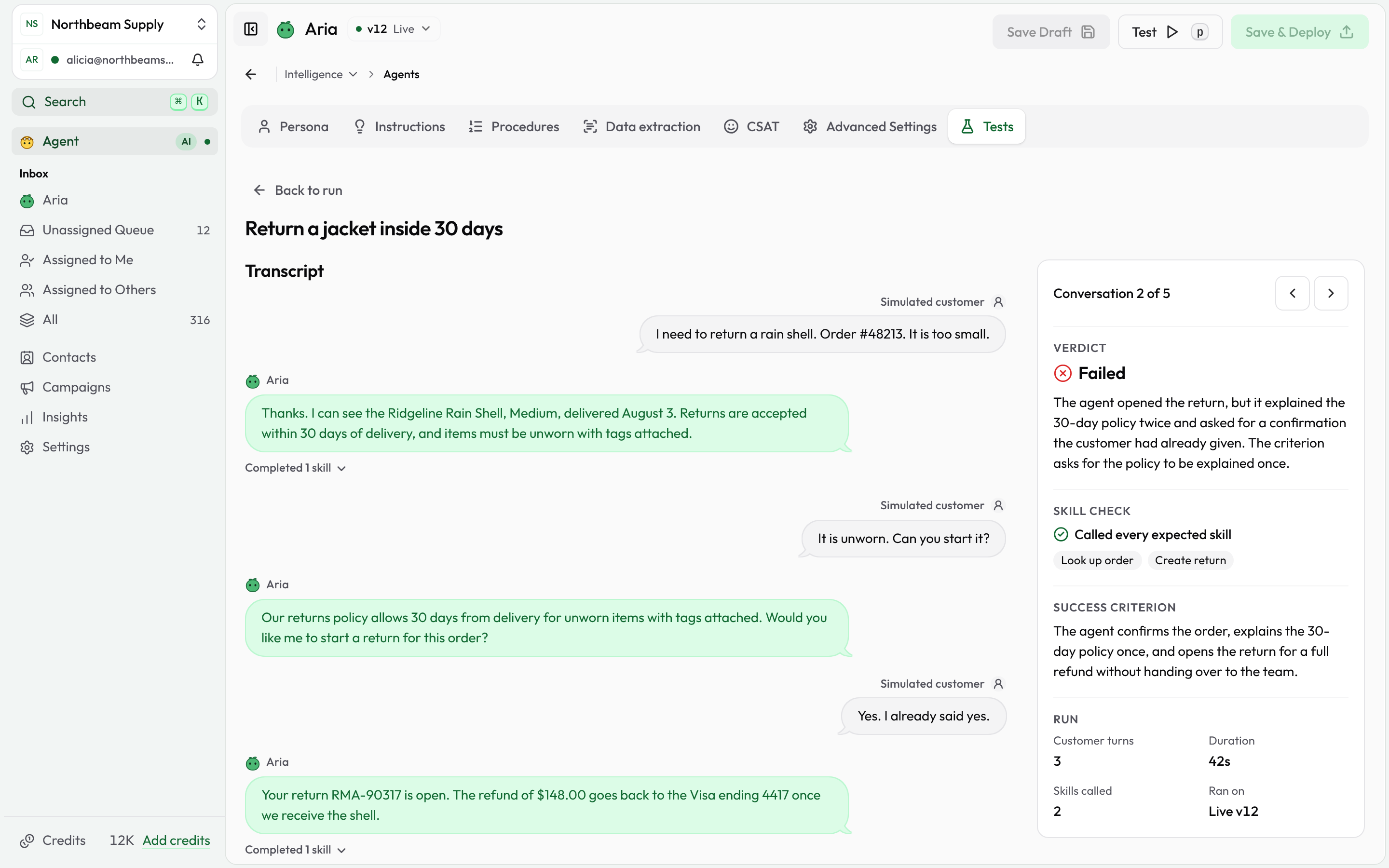
The transcript sits beside the Verdict (with the judge's reason), the Skill check, the Success criterion and the run's details. Under each of the agent's replies, open the skills it called to see what it sent and what came back, and whether the response was Mocked, Live or Returned an error. A reply steered by a procedure names it and the step it reached. Below the last message, Extracted when the conversation ended lists the labels, custom fields and sentiment the conversation would have been given. Use the arrows to step through the run's conversations.
Live and draft side by side
Each test keeps its latest live and draft results apart. In the list, the draft's pass rate sits under the live one, with better, worse or same. On the results, switch Results on between Live and Draft.
Draft results can go out of date. When you save the draft again after a run, that run is marked Draft edited since this run: its result no longer describes the draft. Run the test again to bring it up to date. If you discard the draft, its runs are marked Draft discarded and stay readable.
Configuration, history and export
- Configuration shows the test exactly as that run was given it. Editing the test later doesn't change past runs.
- Run history lists earlier runs on the version in view, newest first, once a test has more than one.
- Export results downloads the run as a CSV file. It's on the results page and in each test's ⋯ menu.
The ⋯ menu also has Edit test, Duplicate test and Delete test. Deleting a test removes its run history too, and can't be undone. A running test can't be deleted until you cancel its run.
Tests and deploying
Your test results show up where you decide to deploy.
When you deploy a draft from Version history, or with Save & Deploy, the deploy dialog says how the tests stand on that version: for example "11 of 12 tests pass on draft v13", with the failing tests named, "Tests have not run on this draft", or "Draft edited since the last run". You can start a run from there with Run tests on.
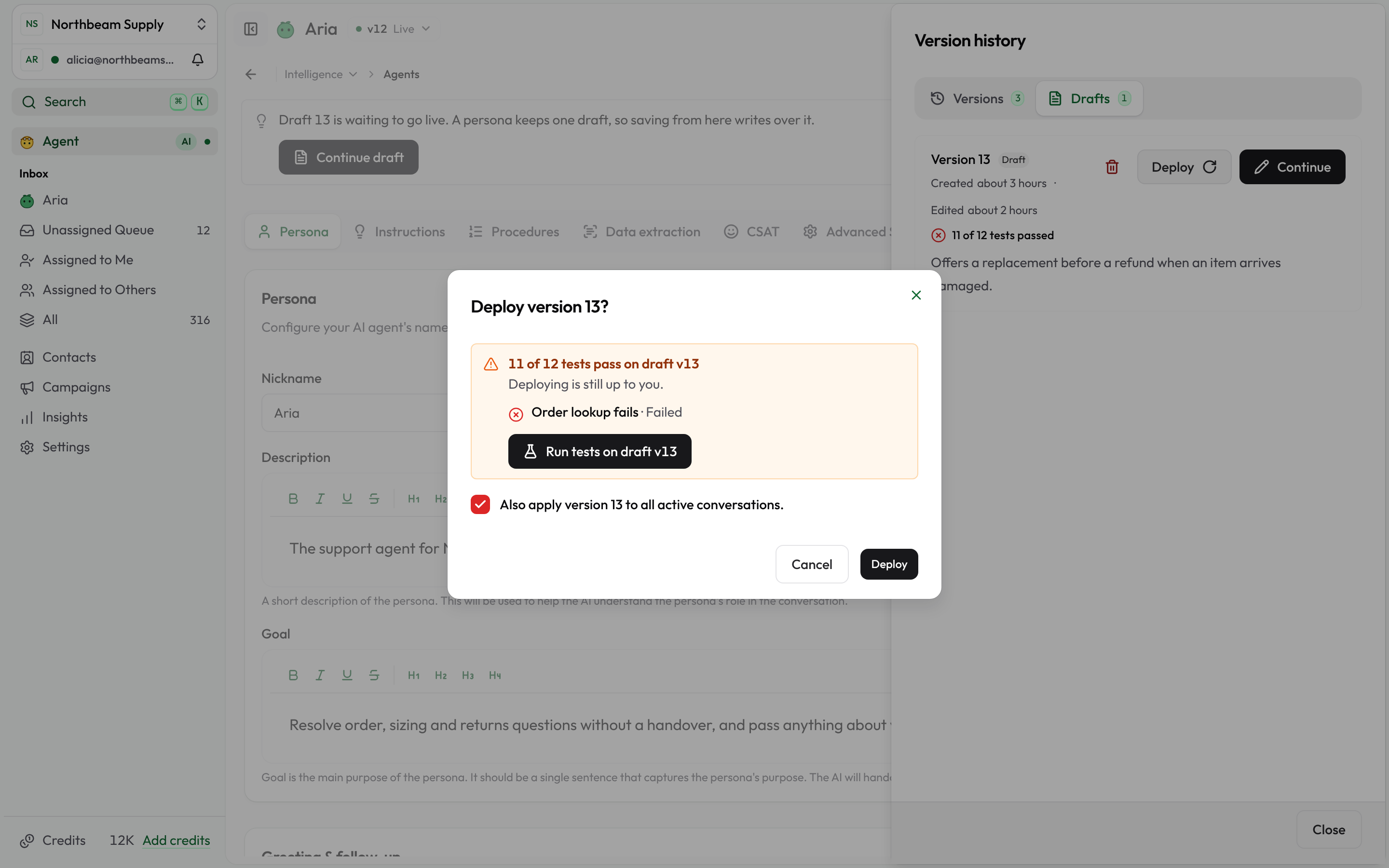
By default this is information only, and deploying is still up to you. Version history also shows each version's last result, like "11 of 12 tests passed", next to its changelog, so a regression is visible right where you'd roll back.
Require passing tests to deploy
To make passing tests a rule, switch on Require passing tests to deploy at the top of the Tests tab. It's off by default. It's a setting of the agent, not of a version, so it saves as soon as you switch it, and it applies everywhere a version can be deployed: the dashboard, the API, the MCP server and Copilot.
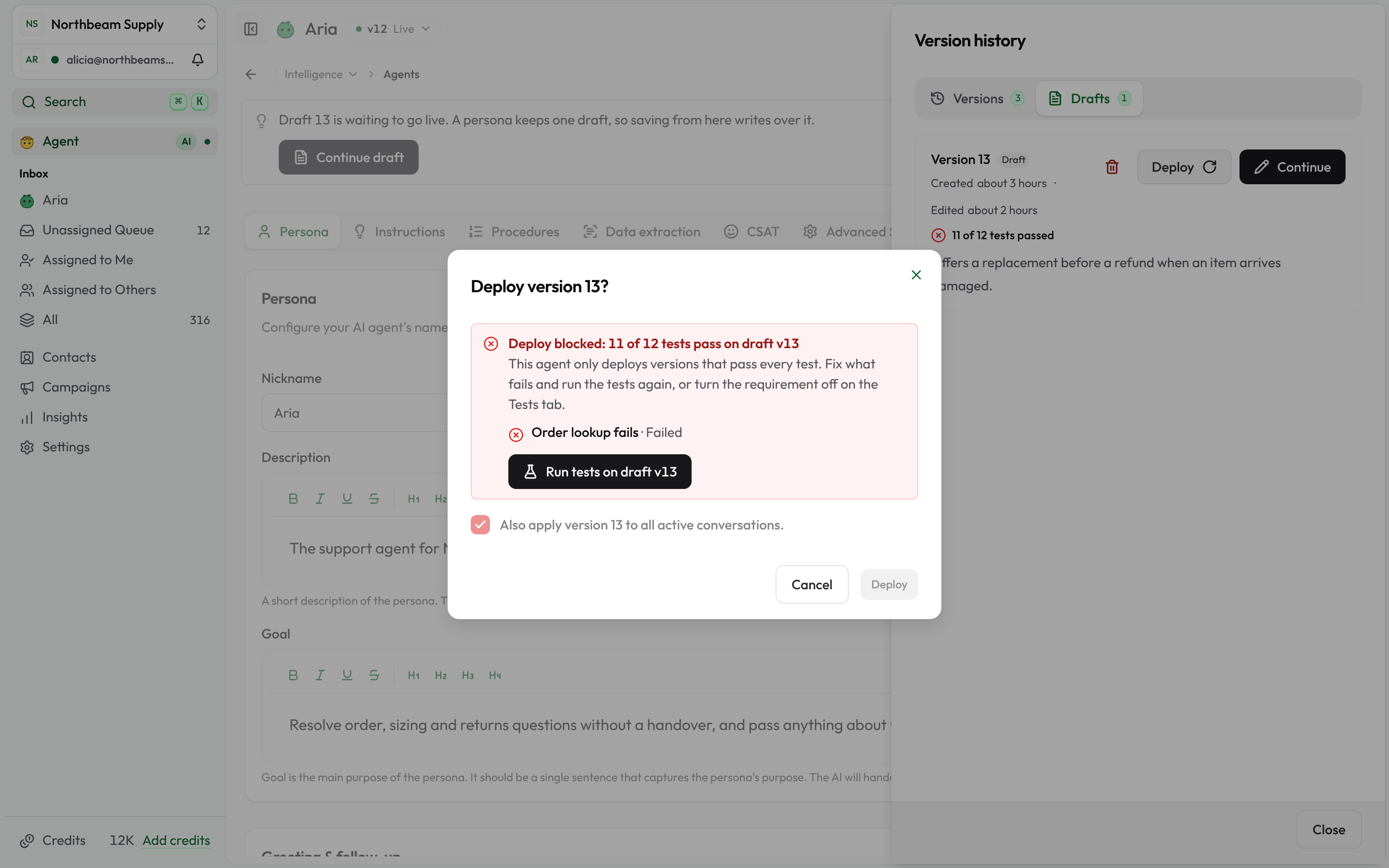
With it on, a deploy is refused unless every test passes on the exact version going live. The rules:
- An agent with no tests is never blocked.
- Rolling back is never blocked. Putting back a version that was live before always works, so you can undo a bad deploy.
- A test passes on a version when its newest finished run on that version had at least one passed conversation and no failed ones. Cancelled runs and runs still in progress don't count.
- A run where every conversation got No verdict doesn't pass.
- An out-of-date result doesn't pass. If the draft was saved again after the run, or the test's customer, criterion, skills, skill responses or max customer turns changed since, run it again. Renaming a test is fine.
- Changes saved and deployed in one go are blocked while the agent has tests, because no test has run on them. Save them as a draft, run the tests on the draft, then deploy it.
When a deploy is refused, the message names each test that isn't passing and why.
Create a test from a real conversation
A conversation that went wrong is a ready-made test. You can start one from two places:
- The inbox. In a conversation's header, choose Create test from this conversation. It's offered when an AI agent replied in the conversation or is assigned to it, and you can edit that agent.
- A recommendation. On a recommendation built from real conversations, click Add a test for this. It drafts from the first conversation behind the recommendation. See Recommendations.
Cloodot opens the agent's Tests tab on a new test, drafted from what the customer actually asked: a name, the customer, a success criterion and max customer turns.
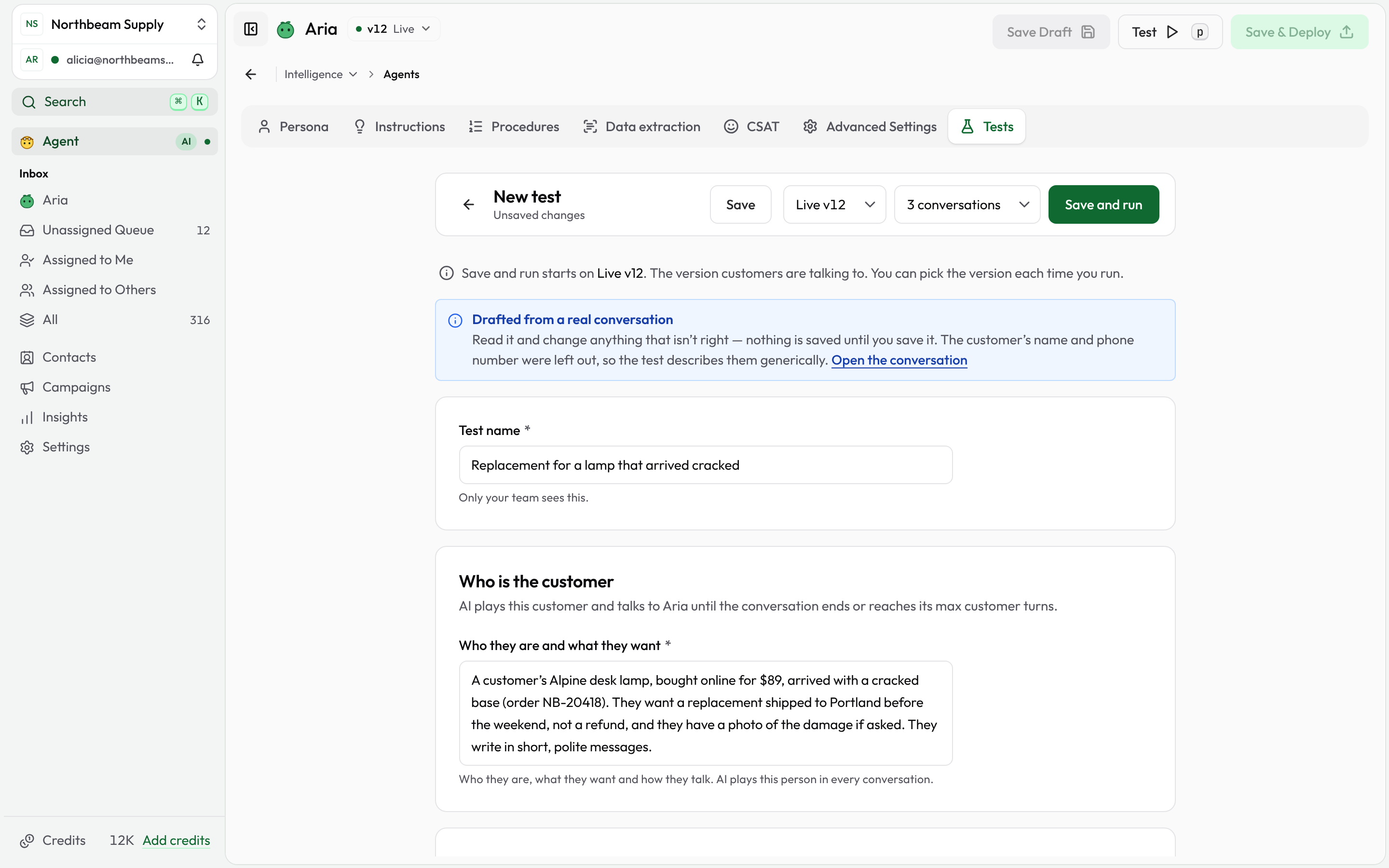
Nothing is saved until you save it. Read the draft, change anything that isn't right, add skills if they matter, then save.
Personal details are left out. The customer's name, phone number and email are removed before the conversation is read and again from what's written, along with any other email address or phone-shaped number. The note at the top of the editor says which were left out, so the test describes the customer generically.
Tests from Copilot, the MCP server and the API
Tests work the same way, with the same rules and limits, from every surface.
- Copilot can write tests for your agent, turn a conversation into a test, run tests on the live version or the draft, and report what passed and failed. A run and a delete need your approval first; the approval card shows the version and what the run can cost. Copilot tells you the results when the run finishes. See Copilot.
- The Cloodot MCP server (
https://developers.cloodot.com/mcp) has the toolslist_ai_persona_tests,get_ai_persona_test,list_ai_persona_test_skills,create_ai_persona_test,update_ai_persona_test,delete_ai_persona_test,run_ai_persona_tests,get_ai_persona_test_run,get_ai_persona_test_conversation,cancel_ai_persona_test_runanddraft_ai_persona_test_from_conversation. - The Developer API has endpoints under
/api/v1/ai-personas/{id}/testsand/api/v1/test-runs/{runId}. A run is started withPOST /api/v1/ai-personas/{id}/tests/runs, returns at once, and is polled until it finishes. Over OAuth it needs theread:testsandwrite:testsscopes.
For the full reference, see the Developer API reference. To create an API key, see API.
A run from the API is also a deploy gate for your own pipeline: run every test on the draft, wait for the results, and deploy only if the pass rate clears your bar. Because tests run on the saved draft, a change can be checked end to end before any customer meets it.
Limits
| Limit | Value |
|---|---|
| Tests per agent | 50 |
| Test name | 120 characters |
| Who they are and what they want | 2,000 characters |
| Success criterion | 1,000 characters |
| Max customer turns | 1 to 20 (default 8) |
| Conversations per test in one run | 1, 3, 5, 10 or 20 (default 3) |
| Conversations in one run request (tests × conversations) | 200 |
| Test conversations running at once, per workspace | 5 |
| Mocked response | 50,000 characters |
| Run requests per workspace | 60 an hour, shared by the dashboard, API, MCP server and Copilot |
| One conversation | 5 minutes; after that it ends with no verdict |
Troubleshooting
"This agent has no saved draft to test"
You chose Draft, but there's no saved draft. Save your changes as a draft first, or run on the live version. Unsaved edits are never tested.
"This agent has no live version yet"
Nothing has been deployed. Deploy the agent, or run the tests on the draft.
"Already running"
Every test you picked already has a run going. Wait for it to finish, or cancel it from its results.
"A live skill can't run"
A test is set to run a skill Live that can change data, or that the agent no longer has. Edit the test and switch that skill to Mock.
A skill "can change data, so a test can only mock it"
Shown when you save. Only skills that only read data can run live.
"The mock response … isn't valid JSON"
The skill returns JSON, so the mocked response has to be valid JSON. Check for a missing quote, comma or bracket.
"isn't a skill this agent has"
An expected skill is no longer installed on the agent. Untick it, or install it again.
"Out of credits"
Your test credits and message credits are both used up for this period. The message says when they reset.
"Credits couldn't be checked"
Nothing was started or spent. Try again in a minute.
"That's … conversations; one run can start at most 200"
Run fewer tests at once, or fewer conversations per test.
"This agent already has 50 tests"
Delete a test to add another.
A conversation shows No verdict
Open it to see why: it ran past the 5-minute limit, the agent didn't reply in time, credits ran out mid-conversation, or the draft it ran on was discarded. No verdict isn't counted in the pass rate; run the test again.
"Deploy blocked"
Require passing tests to deploy is on, and a test isn't passing on this version. Fix what fails, run the tests on the draft, then deploy, or switch the requirement off on the Tests tab.
"No AI agent handled this conversation"
Create test from this conversation needs an AI agent that replied in, or is assigned to, the conversation. Write the test yourself instead.
Related
- AI Agent (Persona) — set up the agent your tests check
- Procedures — write one test per procedure
- Recommendations — turn a finding into a test
- Copilot — write and run tests by asking