Auto-assignment
Hand each new conversation to a teammate automatically, using the signals you choose.
Auto-assignment gives every new conversation to a teammate the moment it arrives, instead of leaving it in the Unassigned Queue for someone to claim. You choose the mode — Manual, Round robin or Auto (AI) — and the signals that decide who qualifies and who among them gets it.
Open the Auto-assignment page
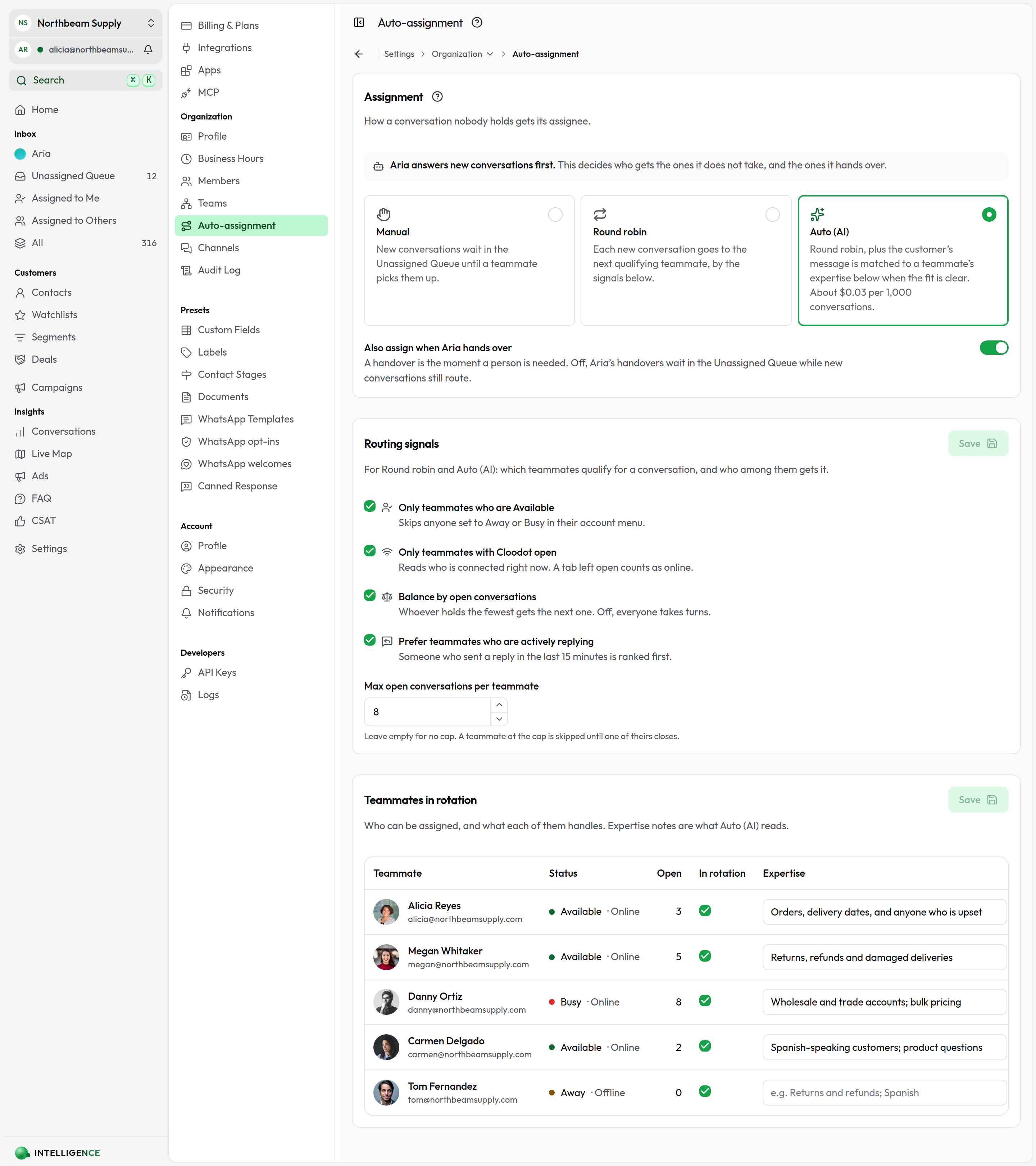
Go to Settings → Organization → Auto-assignment. The page lists for admins and owners.
Choose a mode
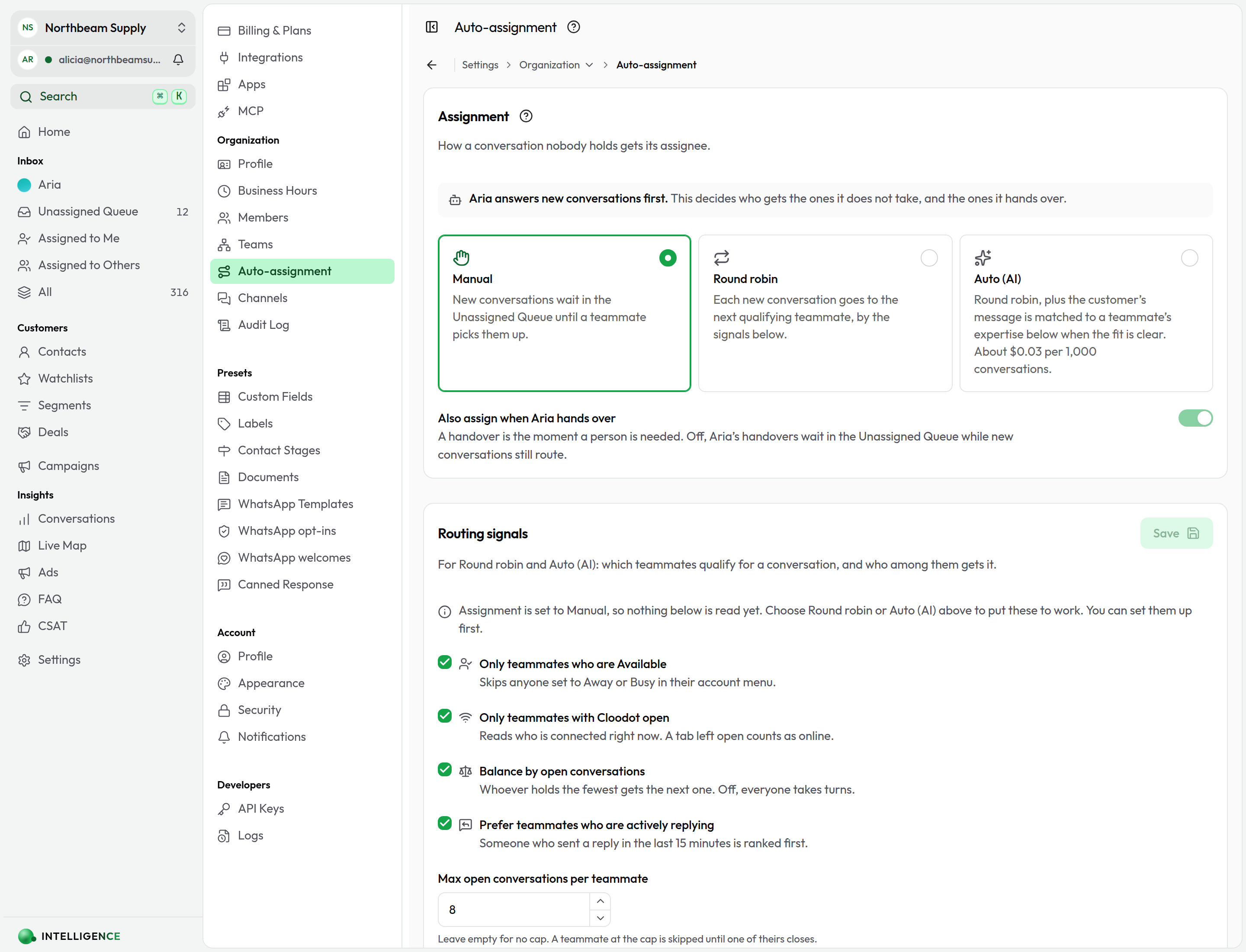
Pick how a conversation nobody holds gets its assignee:
- Manual — today's behaviour. New conversations wait in the Unassigned Queue until a teammate picks them up.
- Round robin — each new conversation goes to the next qualifying teammate, by the signals below.
- Auto (AI) — round robin, plus the customer's message is matched to a teammate's expertise notes when the fit is clear. Available on the Growth plan ($249/month) and above; below that the card is greyed out and names the plan.
If you have an AI agent
Your AI agent answers new conversations first. Auto-assignment decides who gets the ones it does not take, so the two never compete for the same conversation:
- the AI agent answers, and nobody is assigned while it holds the conversation;
- the workspace has no AI agent deployed, or has run out of message credits, so a teammate is assigned straight away;
- the AI agent hands over to a person, and a teammate is assigned then. Keep Also assign when your agent hands over on for this.
When the agent hands over to a team, only that team's members are considered. A handover that comes from a failed or over-long AI session routes the same way, so a conversation the agent gave up on still reaches somebody.
Auto (AI) mode and the AI agent are different things. The agent talks to customers. Auto (AI) only chooses which teammate a conversation goes to, and never writes a reply.
When a conversation is assigned
With Round robin or Auto (AI) on, a conversation nobody holds is assigned when:
- it arrives, and the workspace has no AI agent to take it first;
- a resolved or snoozed conversation is reopened by a customer's message;
- the AI agent hands it over to a person;
- a conversation that has been waiting in the queue gets another message;
- a teammate sets their status back to Available — a few of the oldest waiting conversations route to whoever qualifies.
When nobody qualifies, the conversation waits in the Unassigned Queue. It is not given to someone the signals say should not get it.
Choose the routing signals
On Manual these signals are not read at all, and the page says so. You can still set them up before switching modes.
Two kinds of signal, applied in this order:
Filters decide who can take a conversation.
- Only teammates who are Available — skips anyone set to Away or Busy in their account menu.
- Only teammates with Cloodot open — reads who is connected right now. A tab left open counts as online, which is why availability is a separate signal.
- Max open conversations per teammate — a teammate at the cap is skipped until one of theirs closes. Leave it empty for no cap.
Preferences decide who among them gets it.
- Prefer teammates who are actively replying — someone who sent a reply in the last 15 minutes is ranked first.
- Balance by open conversations — whoever holds the fewest gets the next one. Off, everyone takes turns.
- Ties go to whoever has waited longest since their last automatic assignment.
Click Save to apply the signals.
How Auto (AI) chooses
In Auto (AI) mode each new conversation's message is read against the expertise notes on the roster, and the teammate whose notes clearly cover it is chosen — but only when the match is confident. Otherwise the signals above decide, so the AI can only add a better pick, never withhold one.
The match runs on a small decision model that is billed by what it reads, not what it writes. A routing decision costs about $0.03 per 1,000 conversations; the page quotes the current figure on the card. If a workspace's plan later drops below Growth, it keeps routing as round robin.
Teammates in rotation
The roster shows every teammate with their availability, whether they have Cloodot open, and how many open conversations they hold — the facts the signals read.
- Clear In rotation to keep someone out of auto-assignment altogether, such as an owner who does not answer customers. They can still be assigned by hand.
- Write Expertise in plain words: "Returns and refunds; Spanish", "Wholesale and trade accounts". This is what Auto (AI) reads. On Round robin it is only a note for your team.
Click Save to apply roster changes.
Where it shows
An automatic assignment writes an Auto-assigned entry to the conversation's timeline that names the rule that decided — fewest open conversations, next in rotation, best match for their expertise — and the assignee gets the same notification as for a manual assignment. Changes to the settings and the roster appear in the Audit Log.