Team Handovers
See who finishes the work that gets handed to a team, who passes it along, and how long each takes.
Once a conversation is routed to a team — by your AI agent, or by a teammate choosing a team — this report follows what happened to it.
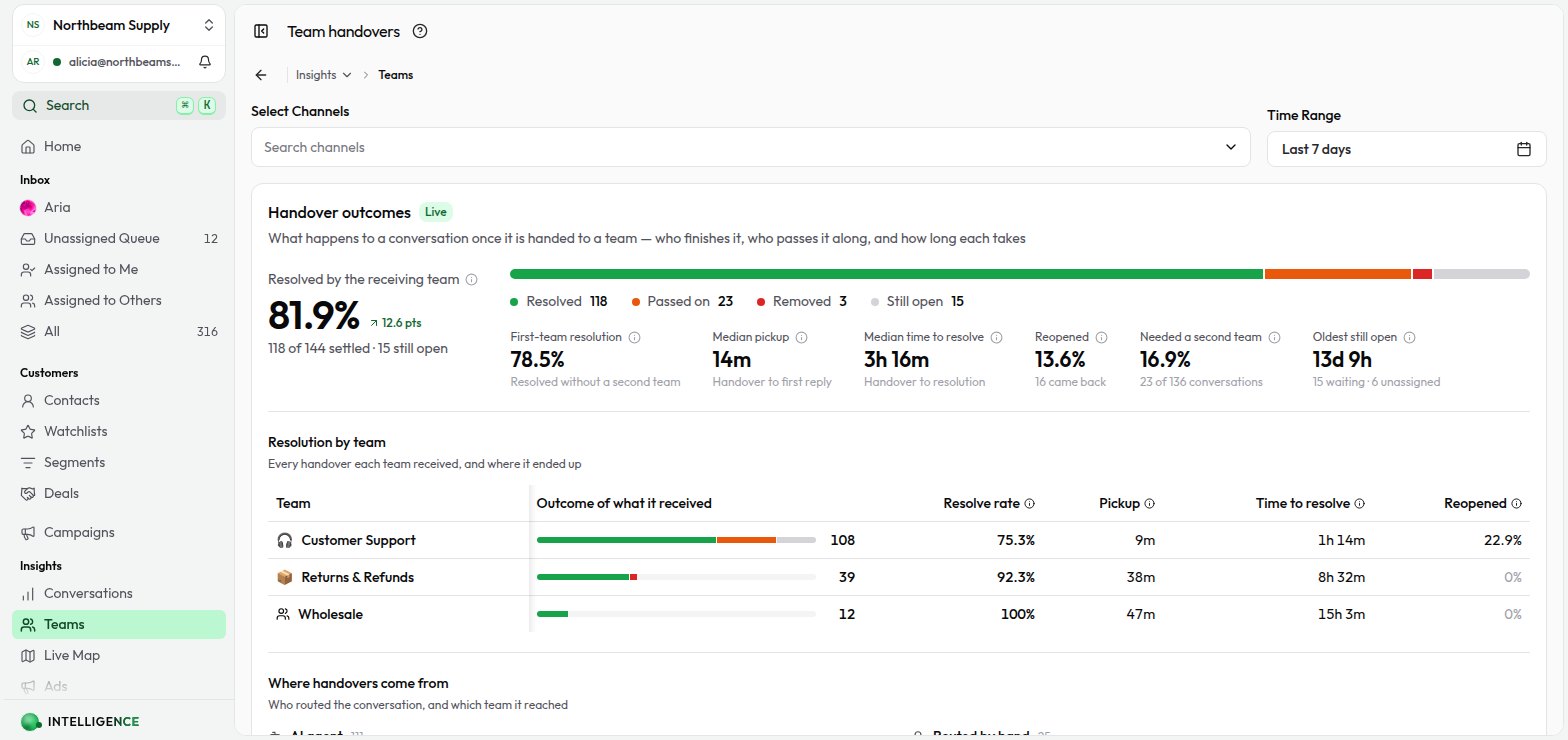
Metrics at a glance
- Handover outcomes — resolved, passed on, removed, or still open
- Resolution by team — what each team received and where it ended up
- Pickup and resolution times — how long a team took to reply, and to finish
- Where handovers come from — the AI, a teammate, or another team
- Handovers over time — what teams took on against what they closed out
Open Team Handovers
- Click Insights in the left sidebar.
- Click Teams.
Teams only appear here once they have a team inbox enabled. Turn that on in Settings → Organization → Teams.
Filters
The time range and channel filters work the same way as on Conversation Insights.
What counts as a handover
Every time a conversation is routed to a team, that is one handover. It stays that team's until one of four things happens:
| Outcome | What it means |
|---|---|
| Resolved | The team that received it finished the conversation. |
| Passed on | It went to a different team before anyone resolved it. |
| Removed | It was taken out of the team inbox without being resolved. |
| Still open | The team is still holding it. |
Routing a conversation to the team that already has it does not start a second handover — re-picking the current team is a no-op, not a hand-off.
Handovers are followed past the end of the range
A handover is counted on the day it reached the team, and then followed to its conclusion even if that lands after the end of your selected range. So the outcomes always describe the same set of handovers, rather than the same stretch of clock. Without this, every handover in the last hours of a range would read as unresolved — which says something about the range, not about the team.
Resolved by the receiving team
The headline rate: handovers a team resolved, as a share of the handovers it received that reached an outcome.
Handovers still in flight are left out until they settle. They have no outcome yet, so counting them would drag the number down for work nobody has failed at — on a Today range, where most handovers are still open, a team doing perfectly well would otherwise read close to 0%.
First-team resolution
The share of handovers resolved by the team that received them first, counting only those that arrived from the AI or a teammate rather than from another team. The rest needed a second team.
This is the closest thing to a routing accuracy score. Helpdesks built around support tiers report the same shape as First Level Resolution; teams in Cloodot are functional rather than tiered, so this counts the first team rather than the first level.
Pickup and time to resolve
- Median pickup — from the handover to the team's first reply to the customer
- Median time to resolve — from the handover to resolution
Both are medians, not averages. One conversation picked up after a weekend would move an average more than the fifty answered in minutes. Time to resolve is measured over resolved handovers only, since an open one has no resolution time yet.
A reply that arrives after a handover has already closed belongs to whoever held the conversation next, so it is not counted against the team that let it go.
Reopened
Conversations a team resolved that the customer brought back within seven days, as a share of what that team resolved. A resolution that did not hold.
Seven days is Cloodot's own window. Cloodot never closes a conversation permanently — a customer reply reopens it however long afterwards — so without a window, a reply months from now would keep changing a number you have already read.
Needed a second team
Conversations that reached more than one team before they settled.
This is what makes a pass-on rate readable. Three teams each passing on a fifth of their work looks mild team by team, and can be one conversation going round the houses.
Oldest still open
How long the oldest unfinished handover has been waiting. A count of open work tells you a queue is deep; this tells you something in it has gone stale.
It covers handovers that arrived in the selected range, so it is not your all-time backlog.
Assigned, versus nobody assigned
With auto-assignment turned on, a handover normally has a teammate's name on it within seconds — the routing picks a member of the team the AI handed it to. The conversation stays in that team's inbox either way, so both states read as still open.
The report separates them. Alongside the open count you get how many have nobody assigned — the ones auto-assignment could not place because no member of that team was available or eligible. Those are the ones worth chasing; the rest already have someone on them.
An assignment is not a reply, so median pickup still measures the time to the team's first message to the customer, not the time to put a name on it.
Where handovers come from
Handovers are grouped by who routed the conversation:
- AI agent — your AI agent escalated and picked the team itself
- Routed by hand — a teammate chose the team
- A team name — that team passed the conversation along
The third group is the one worth reading. A team that mostly receives work from another team is a team the first router keeps missing — which usually means a team description worth rewriting, so the AI routes to it directly.
Reading the conversation timeline
Every routing also appears on the conversation itself, in the activity timeline — naming the team, and whether the AI or a teammate sent it there.